Link Retargeting: The Secret to Recovering Lost Leads (2026 Strategy)
The majority of clicks never convert on the first visit. Learn how to 'pixel' your traffic and retarget users even when sharing third-party content.
The average conversion rate for a first-time visitor is roughly 2%. That means 98% of your hard-earned traffic leaves without buying, subscribing, or calling. If you don't have a plan to bring them back, you are effectively burning 98% of your ad spend. Enter Link Retargeting.
Table of Contents
The Leaky Bucket Problem
Most marketing funnels are leaky buckets. You pour traffic in, and most of it spills out the holes. Retargeting (or remarketing) is the act of putting a bucket underneath the leaks to catch the water and pour it back in.
Traditionally, you can only retarget people who visit your website because that's the only place you can install the tracking pixel. But what about the content you share on social media that isn't yours? The industry news, the PR features, the YouTube videos?
How Link Retargeting Works
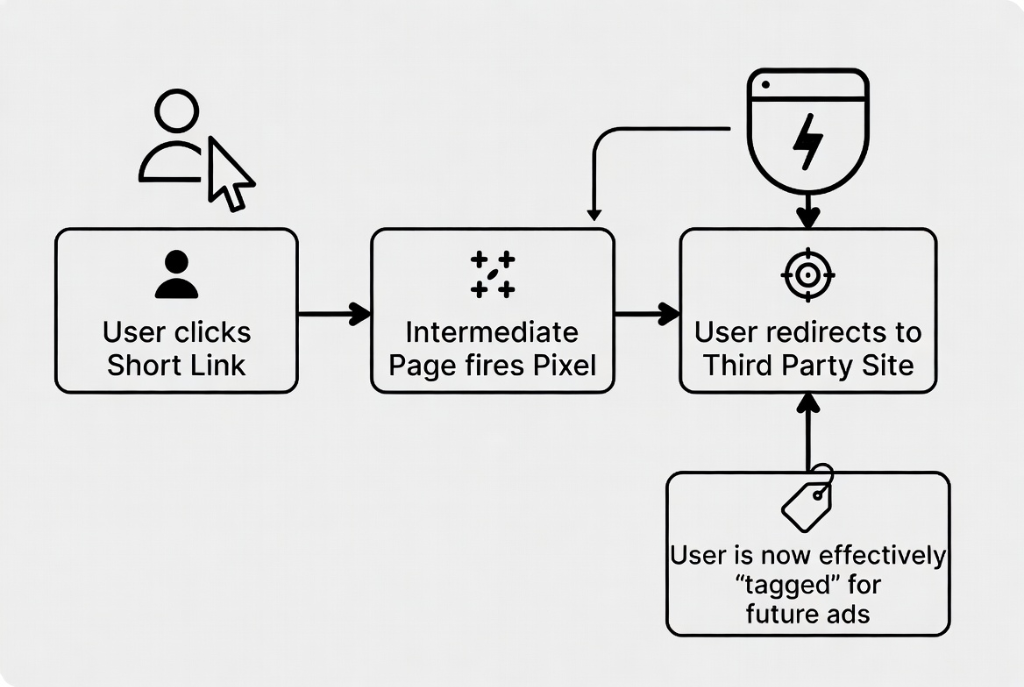
Link retargeting moves the pixel from the destination to the bridge.
- You configure your retargeting IDs (Facebook Pixel, Google Tag) in BrandVia.
- You create a short link (e.g.,
link.brand.com/news) pointing to an article onnytimes.com. - When a user clicks your short link, BrandVia briefly loads the pixels before redirecting the user to the New York Times.
- The user is now in your "Custom Audience," even though they never visited your actual website.
The Superpower: Retargeting on Third-Party Content
This changes the game for content curation.
Scenario: You sell high-end coffee machines. You find a viral article titled "Why cheap coffee makers ruin the taste."
Old Way: You share the article. People read it and agree. You get nothing.
New Way: You share the article via a retargeting link. Everyone who clicks it is pixelated. You then run a Facebook Ad specifically to that audience showcasing your high-end machine with the copy: "Taste the difference."
You have identified High Intent users (people who care about coffee taste) without creating the content yourself.
Supported Platforms
Link retargeting works with almost any platform that uses cookie-based or server-side audience building:
- Meta (Facebook/Instagram): Perfect for B2C products.
- Google Ads: Great for display network retargeting.
- LinkedIn: The holy grail for B2B. Share industry reports and retarget the C-suite readers.
- Twitter/X & TikTok: Emerging but effective for specific demographics.
Ethical Considerations & Privacy
With great power comes great responsibility. Privacy laws (GDPR, CCPA) still apply.
You must ensure that your Privacy Policy discloses that you use tracking pixels on your links. Furthermore, pixel firing often depends on the user's consent state if you are using advanced consent modes. BrandVia recommends being transparent. Don't be creepy. Retarget with value, not spam.
Common Mistakes to Avoid
- ✕ Retargeting Everyone: Don't treat a click on a meme the same as a click on a pricing page. Segment your audiences.
- ✕ Frequency Overload: Just because you *can* show them your ad 50 times doesn't mean you should. Cap your frequency to avoid brand fatigue.
Frequently Asked Questions
Does this slow down the redirect?
Minimally. The redirect might take a fraction of a second longer to allow the script to execute, but modern edge networks make this imperceptible to most users.
Does it work on iOS 14+?
Apple's ATT (App Tracking Transparency) has limited the efficacy of cookies, but link retargeting remains one of the more robust methods because it happens in the browser environment. However, match rates will never be 100%.
Ready to put this into practice?
Start creating branded links today and watch your engagement soar.
Get Started for Free